Contents
- What is a MAC address?
- Why does Magma need a MAC address?
- How do I use Magma to list my machine's MAC addresses?
- How do I determine my MAC addresses...
- I'm still struggling to discover my MAC addresses under Linux.
- I tried that, and it didn't work. Now what?
- I have more than one MAC address. Which one should I use?
- I don't have a MAC address! What can I do?
- How do I send you my MAC addresses?
- The order form complained about a bad MAC address. What should I do?
- I replaced or upgraded my hardware, and now my MAC addresses are different. What should I do?
What is a MAC address?
First note that a MAC address has nothing to do with Mac OS X or Macintosh computers. It is an abbreviation of “Media Access Control” and is supported by all modern computer hardware.
A MAC address is an essentially unique number associated with a network card in a machine; it serves as a convenient way to distinguish between two different computers. A MAC address consists of 48 bits, usually represented as a string of 12 hexadecimal digits (0 to 9, a to f, or A to F); these are often grouped into pairs separated by colons or dashes. For example, the MAC address 001B638445E6 may be given as 00:1b:63:84:45:e6 or as 00-1B-63-84-45-E6.
Why does Magma need a MAC address?
The MAC address is used to generate the magmapassfile, so that Magma will run on the appropriate machine. Note that modern machines will often have several MAC addresses; for greatest reliability, all of the machine's MAC addresses should be sent.
For new installations, if you are able to send us the machine's MAC addresses during the ordering process then we can send you an appropriate magmapassfile along with the download instructions and you will be able to start using Magma immediately. Otherwise, after installing Magma you can have Magma tell you the machine's MAC addresses; you can them email them to us and we will send back the appropriate magmapassfile.
How do I use Magma to list my machine's MAC addresses?
When you try to start Magma without an appropriate magmapassfile, it should print an error message and exit. Part of this message will be the MAC addresses that it detected for your machine. Send in all of these.
Note: You will have to run Magma from a shell or command/terminal window in order to see this message. Otherwise the window will close before you have time to read it!
How do I determine my MAC addresses...
...using macOS?
To determine the MAC addresses of a machine running macOS, open the Terminal application (here are Apple's instructions on opening the Terminal) and run the following command:networksetup -listallhardwareportsThis will print descriptions that look like this:
Hardware Port: Ethernet
Device: en0
Ethernet Address: 38:c9:86:41:53:41

Hardware Port: Wi-Fi
Device: en1
Ethernet Address: 28:f0:76:40:4d:c0
The XX:XX:XX:XX:XX:XX values in the output are the MAC addresses.
More compact output suitable for copying directly into an email or form can be generated with the following variant of the above command:
networksetup -listallhardwareports | awk '/^Ethernet/ {print $3}' | awk '!(/.[26aeAE][-:]..[-:]..[-:]..[-:]..[-:]../) {print $1}' This will print only the MAC addresses that are not private or rotated. 38:c9:86:41:53:41 28:f0:76:40:4d:c0
...using Linux?
To determine the MAC addresses of a machine running Linux, begin by creating a shell or terminal window, if you do not already have one. If using a desktop environment such as Gnome or KDE, this can usually be found as an option in the right mouse button menu (common choices of name are “Terminal”, “Konsole”, or “Shell”). The other likely location is in the Applications menu, possibly in the System Tools submenu.
In the shell, type the following:/sbin/ifconfig -aThis command will print information on all networks in the system. The relevant line(s) will look like this:
eth0 Link encap:Ethernet HWaddr XX:XX:XX:XX:XX:XXwhere each X is a hexadecimal digit (0 to 9 or A to F).
The XX:XX:XX:XX:XX:XX part from the above is the MAC address. If there is more than such line, then all of the corresponding MAC addresses should be sent.
...using Windows Vista or Windows 7?
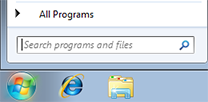
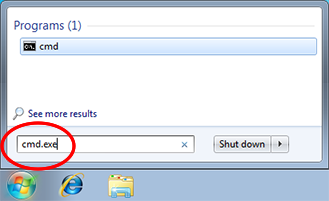
To determine the MAC addresses of a machine running Windows Vista or Windows 7, click on the Start menu, type “cmd.exe” in the “Search programs and files” box, and press Enter. This will open up a command shell.
getmac
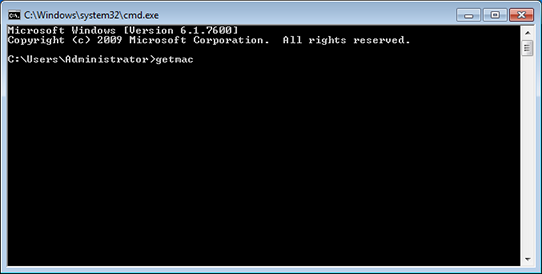
and press Enter. This command will print some information on all network cards in the system.
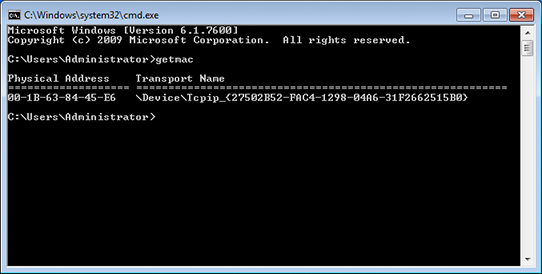
The XX-XX-XX-XX-XX-XX part from the above, where each X is a hexadecimal digit (0 to 9 or A to F), is the MAC address. If more than one line is printed, then all of them should be sent.
...using Windows XP?
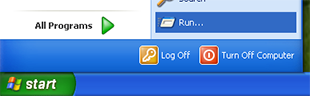
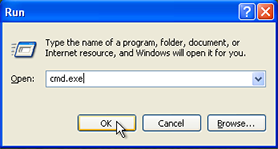
To determine the MAC addresses of a machine running Windows XP, click on the Start menu and select “Run...”. Type “cmd.exe” and press the OK button. This will open up a command shell.
getmac
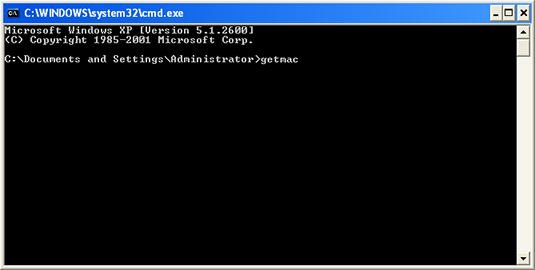
and press Enter. This command will print some information on all network cards in the system.
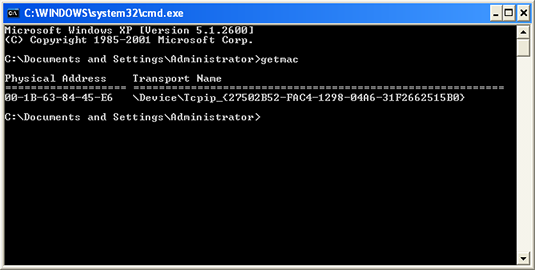
The XX-XX-XX-XX-XX-XX part from the above, where each X is a hexadecimal digit (0 to 9 or A to F), is the MAC address. If more than one line is printed, then all of them should be sent.
...using an older version of Windows?
If the method above using getmac does not work for you, this alternative may be worthwhile trying. Open a command shell as above, and in the command shell type:
ipconfig /alland press Enter. This command will print information on all network cards in the system.
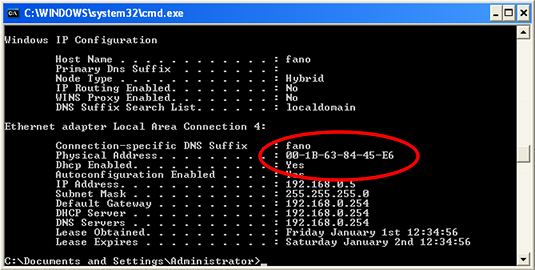
Physical Address. . . . . . . . . . : XX-XX-XX-XX-XX-XXand the XX-XX-XX-XX-XX-XX part is the MAC address. If more than one physical address is printed, then all of them should be sent.
...using Solaris?
To determine the MAC addresses of a machine running Solaris, begin by creating a shell or terminal window, if you do not already have one.
If you have superuser access to the machine, run su to become the superuser and type the following command:/usr/sbin/ifconfig -aThis will print information on all networks in the system. The relevant line(s) will look like this:
ether XX:XX:XX:XX:XX:XXwhere each X is a hexadecimal digit (0 to 9 or A to F). (Note: some fields may have only one digit in them. This is OK.)Unfortunately, the previous approach does not work without superuser access (all information except the MAC address is displayed in that case). If your machine's network interface is currently up (i.e., it is connected to a network) you may be able to use arp instead. Type the following command:
arp `hostname`This command will print address resolution information for the machine. The relevant line(s) will look like this:
foo (xx.xx.xx.xx) at XX:XX:XX:XX:XX:XX permanent publishedwhere each X is a hexadecimal digit (0 to 9 or A to F). (Note: some fields may have only one digit in them. This is OK.)
The XX:XX:XX:XX:XX:XX part from the above is the MAC address. If there is more than such line, then all of the corresponding MAC addresses should be sent.
...using some other operating system?
For UNIX systems, try running ifconfig as described in the Linux instructions. If that does not work, it is possible that the output from running dmesg will include the MAC address (amongst a lot of other information). Of course, if you have a local sysadmin they can probably determine this information for you. If all else fails, you can always get Magma to tell you the MAC addresses.
I'm still struggling to discover my MAC addresses under Linux.
To determine the MAC addresses for each machine, you can try using this very simple Linux program:
Assuming it is downloaded to the current directory, run the program by typing
chmod a+rx macaddr
./macaddr
in the shell. This will print the MAC address and the hostname, if present, in brackets. The hostname is not essential, but can be convenient for identification purposes. For example:
00:1b:63:84:45:e6 [fano]Mail the output of this program, run on all of your machines, to us and we will reply with your password file (your magmapassfile).
If the macaddr program fails work on an x86/x86_64 machine, then try this version:
- macaddr for x86/x86_64 machines [378KB].
I tried that, and it didn't work. Now what?
If you have followed the appropriate steps above and still been unable to determine your machine's MAC addresses, you can always get Magma itself to tell you what MAC addresses your machine has. When you try to start Magma without an appropriate magmapassfile, it should print an error message and exit. Part of this message will be the MAC address(es) that it detected for your machine. Send in all of these.
Note: you will have to run Magma from a shell or command window in order to see this message. Otherwise the window will close before you have time to read it!
The drawback of this approach is that you will then have to send us your MAC addresses and wait for the magmapassfile to be generated. If you are able to tell us the MAC addresses ahead of time (i.e., at the point of ordering Magma), then we can send you an appropriate magmapassfile along with the download instructions, and you will be able to start using Magma immediately.
I have more than one MAC address. Which one should I use?
For greatest reliability, all of the MAC addresses should be sent. Some MAC addresses may correspond to removable devices or randomised values that are only valid for a short time, but as long as Magma is able to detect any of the given addresses then it will run.
I don't have a MAC address! What can I do?
Email us and we'll see what we can work out.
How do I send you my MAC addresses?
You can specify it in the appropriate section of the order forms, or simply email it to us.
The order form complained about a bad MAC address. What should I do?
The order form expects the MAC addresses to be specified in one of a few ways; if you use a different format then it will be unable to recognise the MAC addresses. Each MAC address must be specified using hexadecimal digits (0 to 9 or A to F), possibly with separators between them. In the following format descriptions, X will indicate a value which must be such a hexadecimal digit, and Y indicates either 1 or 2 hexadecimal digits. The formats understood are:
- Exactly twelve hexadecimal digits: XXXXXXXXXXXX, e.g.
- 001B638445E6.
- Exactly six components separated by either colons or dashes: Y:Y:Y:Y:Y:Y or Y-Y-Y-Y-Y-Y, e.g.
- 00:1b:63:84:45:e6
- 00-1B-63-84-45-E6
Formats other than the above will not be recognised. Note that it doesn't matter whether lower case or upper case letters are used, and when separators are used a leading zero may be omitted from any component. In most cases it should be possible to directly copy-and-paste the value obtained by following the instructions above.
If you think that you have followed the format but are still getting an error message, re-type the entry carefully; it may be that you have accidentally used a letter instead of a number (or vice versa). For instance, typing a capital ‘o’ instead of a zero is an easy mistake to make.
I replaced or upgraded my hardware, and now my MAC addresses are different. What should I do?
Send us the new MAC addresses and we will send you an updated magmapassfile for use with your new hardware configuration.